Blog
Wi-Fi 5 vs. Wi-Fi 6 vs. Wi-Fi 6E: What’s the Difference and When to Upgrade


Your wireless network works fine today. But you’re hearing about Wi-Fi 6. And now there’s Wi-Fi 6E? You’re wondering if you need to upgrade, or if this is marketing hype designed to make you replace equipment that’s still perfectly functional. You are thinking, what are the differences between Wi-Fi 5 vs. Wi-Fi 6 vs. Wi-Fi 6E?
It’s a fair question. So let’s look at what you need to know to make an informed decision.
Wi-Fi generations matter, but not always for the reasons you think. And the answer to “should I upgrade to Wi-Fi 5 vs. Wi-Fi 6 vs. Wi-Fi 6E?” depends entirely on your specific situation and not on what’s newest.
Breakdown of Wi-Fi 5 vs. Wi-Fi 6 vs. Wi-Fi 6E
Wi-Fi 5 (802.11ac): What You Probably Have Right Now
Wi-Fi 5 launched in 2013. If your access points are more than 4-5 years old, you’re likely running Wi-Fi 5. Or possibly older.
The specs that sound impressive:
- Up to 3.5 Gbps theoretical maximum speed
- Operates on 5 GHz frequency only
- 80 MHz or 160 MHz channel width
- Beamforming (directs signal toward devices)
What this actually means for your business:
- Fast enough for most office work
- Better than older standards
- Works fine with 50-100 devices per AP under normal load
- Struggles when everyone’s on video calls simultaneously
Real-world speed:
You’re probably getting 300-500 Mbps in practice, not the theoretical 3.5 Gbps. (The theoretical maximum assumes perfect conditions, zero interference, and maximum channel width. Real life is messier.)
When Wi-Fi 5 is still fine:
- Small offices (under 75 people)
- Moderate device density
- Mostly office work (email, documents, occasional video)
- You don’t have interference issues
When Wi-Fi 5 is struggling:
- Growing companies adding devices faster than you expected
- Everyone’s on video calls all day
- You’ve got interference from neighbouring networks
- Multiple departments with heavy data usage simultaneously
Wi-Fi 6 (802.11ax): The Real Upgrade
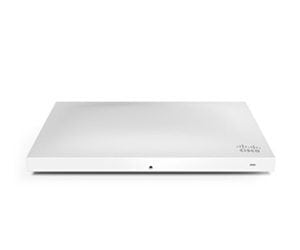
Wi-Fi 6 started rolling out in 2019. Most modern access points sold today are Wi-Fi 6. Meraki’s MR44 and MR46 series all support Wi-Fi 6.
The specs that actually matter:
- Up to 10 Gbps theoretical maximum (but this is 802.11ax aggregated across 160 MHz channels, not practical)
- Operates on both 2.4 GHz and 5 GHz simultaneously
- OFDMA (divides channels into smaller sub-channels)
- MU-MIMO improved (better at handling multiple devices at once)
- Target Wake Time (devices wake up less often, use less battery)
What this actually means for your business:
OFDMA is the game-changer. Instead of devices taking turns using the full channel, OFDMA lets multiple devices share the channel simultaneously by dividing it into sub-channels. It’s like adding lanes to a highway.
Real-world speed? You’re looking at 600-1000 Mbps in practice with modern devices. That’s 2-3x faster than Wi-Fi 5.
But if you’ve got 50 devices on Wi-Fi 5 and they’re all getting decent speeds, upgrading to Wi-Fi 6 won’t necessarily make them faster. It makes the network handle more devices without slowing down.
Wi-Fi 6 shines when:
- You’ve got 100+ devices per AP
- Everyone’s on video calls simultaneously
- Multiple departments doing heavy data work at the same time
- You’re in a dense environment with interference
Real-world example:
We worked with a company that went from 80 employees to 150 over two years. With Wi-Fi 5, performance tanked around 2pm every day (peak meeting time). They added more access points, but Wi-Fi 5 still struggled because they were hitting the efficiency limits of the standard.
Upgrading to Wi-Fi 6 (keeping the same number of APs) solved the problem. Same hardware, same deployment, but the Wi-Fi 6 standard handled the concurrent load better.
Meraki Wi-Fi 6 options:
All cloud-managed through the same Meraki dashboard, so no additional complexity.
Wi-Fi 6E: The Newest Option
Wi-Fi 6E launched in 2021. It’s Wi-Fi 6, but with access to a new frequency band: 6 GHz.
What’s new with Wi-Fi 6E:
- Same Wi-Fi 6 technology
- Adds 6 GHz frequency band (on top of 2.4 GHz and 5 GHz)
- 6 GHz is essentially empty (nobody’s using it yet)
- Massive new spectrum capacity
What this actually means:
6 GHz gives you a lot of new channels to work with. No interference from your neighbours’ Wi-Fi because they don’t have Wi-Fi 6E equipment yet. It’s like getting a brand new highway that nobody else is using.
But ensure that your devices are Wi-Fi 6E compatible. iPhones (iPhone 15+), newer Macs, newer Android phones, and new laptops support it. Older devices? They’ll just use 5 GHz or 2.4 GHz.
Real-world speed with Wi-Fi 6E:
- Devices that support it: 1000+ Mbps in good conditions
- Devices that don’t: Same as Wi-Fi 6 (600-1000 Mbps)
Wi-Fi 6E matters when:
- You’re upgrading anyway and want future-proofing
- You’re in a very dense environment with lots of interference
- Most of your user devices are modern (iPhone 15+, newer laptops)
- You’re building a new network from scratch
Wi-Fi 6E is overkill if:
- You’ve got older devices that don’t support it
- Your current network performance is fine
- You’re a smaller company without heavy concurrent usage
Meraki and Wi-Fi 6E:
Cisco Meraki offers Wi-Fi 6E access points (MR46E), and they integrate seamlessly into the Meraki dashboard. You don’t need to buy all Wi-Fi 6E, you can mix Wi-Fi 6 and Wi-Fi 6E APs in the same network, and the dashboard manages both.
The Real Decision is Speed vs. Capacity
You don’t upgrade because you need faster speed. You upgrade because you need to handle more devices or more concurrent usage.
A company with 30 people running Wi-Fi 5 doesn’t need Wi-Fi 6 for speed. They upgrade when they hit 100 people and Wi-Fi 5 APs are overloaded.
Ask yourself these questions:
- How many people will be on my network in 2 years? If you’re growing from 100 to 150+, Wi-Fi 6 makes sense now.
- Is everyone on video calls simultaneously? If yes, Wi-Fi 6 handles it better. If no, Wi-Fi 5 is fine.
- Are my devices old or new? Old devices don’t care about Wi-Fi 6E. Newer devices benefit more.
- Is my current network performing well? If it is, upgrading for the sake of upgrading is a waste. If it’s struggling, upgrade to the next generation.
- What’s my budget? Wi-Fi 6 APs cost more than Wi-Fi 5 (maybe 30-40% more). Wi-Fi 6E costs more still. Is the ROI there?
The Meraki Advantage in This Decision
With Meraki, you can:
- Mix Wi-Fi 5 and Wi-Fi 6 APs in the same network
- Manage them from one dashboard
- Upgrade gradually (replace older APs as they age)
- See performance metrics that actually tell you if you need to upgrade
You’re not locked into a rip-and-replace. You can upgrade strategically based on actual network performance data, not on marketing hype.
Meraki also handles device band steering automatically. If a newer device supports Wi-Fi 6E and you’ve got Wi-Fi 6E APs available, it steers that device there. Older devices stick to Wi-Fi 5/6. No manual configuration.
Not sure if your current Wi-Fi is the bottleneck or if you need to upgrade?
Let Steve run a network assessment. We can tell you exactly where you stand and when upgrading actually makes sense for your business.