Blog
How G5 Technologies Deploys Meraki Wi-Fi 6


A behind-the-scenes look at what actually happens from site survey to handover.
A Scottish hospitality business with two floors, a busy back office, and a guest network that hadn’t been touched since the original fit-out. Staff complained about dropped video calls during peak hours. The back-office system was on the same SSID as the customers. Nobody could tell you what was connected to the network, let alone what it was doing.
The Wi-Fi worked, just about. But “just about” is doing a lot of heavy lifting when you rely on it to take orders, process payments, and run your EPOS system.
This is the kind of situation G5 Technologies encounters regularly. And this is what we do about it, step by step, from the first conversation to completion.
The brief
The business had come to G5 Technologies via CloudSE after searching for a Meraki installer in Scotland. They’d had Meraki kit for a couple of years, installed by the company that handled their fit-out. It had been online ever since, unconfigured and unmanaged.
The pain points were familiar: slow Wi-Fi in the back of house, no visibility over who or what was on the network, and a Meraki licence that was approaching expiry with nobody aware of it.
There were constraints too, the kind that are common in older Scottish buildings. It was a listed property, so surface cabling wasn’t straightforward. The business couldn’t afford extended downtime, so any disruption had to be managed carefully. And like most SMBs, there was a budget to work within, which meant every decision needed to be justified.
Site survey and design
Before any kit is ordered or any work is booked, G5 Technologies carries out a predictive site survey. We model the wireless coverage across the building, in plain terms, it’s a heatmap that shows where signal will be strong, where it’ll degrade, and where dead spots are likely to form based on wall materials, floor layouts, and interference sources.
It’s easy to underestimate how much this step matters. Wi-Fi problems often aren’t about having too few access points, they’re about having them in the wrong places, broadcasting at the wrong power levels, or competing with each other on the same channels.
For this project, the survey flagged that the existing access points were ceiling-mounted centrally on each floor, which looked neat but left several key areas underserved. The back-of-house team, who needed the most reliable connection, were furthest from any access point.
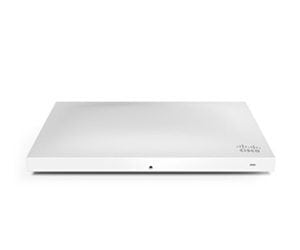
The design phase also involves making the right hardware decisions. For most Scottish SMBs, the Meraki MR36 is the right access point: capable, cost-effective, and more than sufficient for standard office or retail environments. The Meraki MR44 comes into play where you have genuinely high-density spaces like conference rooms, large open-plan floors, or venues where 50+ devices are connecting in one area. For this project, we specified MR44s in the main trading area and MR36 elsewhere.
We also design for the worst case. Not an average Tuesday but a busy Friday when every staff device, every customer phone, and every back-office system is connected simultaneously. Coverage that holds up then will hold up always.
Installation day
The install was scheduled for a Sunday morning, out of hours, minimal disruption, back online before the Monday morning shift.
Works started with cabling. In a listed building, that means working carefully within existing voids and being creative about routing. One cable run required threading through a ceiling void that turned out to be significantly shallower than the building plans suggested, which is not unusual in older Scottish properties. It added an hour, but it was done cleanly and without any surface-mounted trunking.
The existing PoE switch was swapped out for a Meraki MS model, which brings the switching layer into the same dashboard as the wireless, having one pane of glass for everything.
Access points were mounted, claimed into the Meraki dashboard, and configured on-site. That configuration is where the real work happens. Staff devices went onto a dedicated SSID with traffic prioritisation for the EPOS system. Guests went onto a separate SSID with a captive portal with a daily password and content filtering enabled. IoT devices (card terminals, printers) were isolated on their own VLAN, invisible to the rest of the network.
By noon, everything was live, tested, and labelled in the dashboard.
Handover and training
A clean install isn’t a handover. At G5 Technologies, every deployment finishes with three things: a one-page network diagram showing every device, SSID, and VLAN; a dashboard login for the client, with their own admin credentials; and a walkthrough.
That walkthrough isn’t a technical deep-dive. It’s focused on what the client actually needs to know, how to see who’s connected, how to pull a usage report, and who to call if something looks wrong. Most clients don’t want to manage the network themselves, but they do want to understand it. That’s a reasonable expectation and we make sure it’s met.
Ongoing management transfers to G5 Technologies at this point. We monitor firmware updates, licence tracking, and quarterly reviews, all handled under a CloudSE managed services agreement.
90 days later
Three months on, the results were measurable. Zero unplanned outages since the install. Average connection speeds in the back office were significantly improved. The EPOS system, which had been timing out intermittently during busy periods, had been stable throughout. The guest network was compliant, logged, and functioning as intended for the first time.
The client’s words were straightforward: “We didn’t realise how much the old setup was costing us until it wasn’t a problem anymore.”
That’s the outcome G5 Technologies aims for. Not impressive dashboards or technical reports, but a network that quietly does its job and stops being something you have to think about.
Frequently asked questions
How long does a Meraki Wi-Fi 6 install take? For a typical Scottish SMB, one or two sites, 10–30 access points, installation is usually completed in a single day, often out of hours. The site survey and design phase typically takes one to two weeks beforehand.
Do you cover the Highlands? Yes. G5 Technologies works across Scotland, including the Highlands, Islands, and remote sites. We’re Aberdeen-based, which puts us well-positioned for projects across the north of Scotland in particular.
Can you take over an existing Meraki network? Yes and it’s one of the most common enquiries we receive. If your kit is current and your licences are in order, transition to G5 managed services is straightforward. If licences have lapsed or hardware is end-of-life, we’ll tell you clearly what needs to change and what doesn’t.
If your Wi-Fi is the thing your staff complain about, it’s worth a conversation.